LianLian configuration guide
This guide walks you through locating your LianLian merchant information, configuring the two RSA key roles, reviewing callback settings, and saving the connection in EFundPay Dashboard.
You need the following values from the same LianLian account and environment:
| EFundPay field | Source | Purpose |
|---|---|---|
| LianLian Merchant ID | Merchant Management → Merchant Information → Merchant Number | Identifies the LianLian Global Acquiring merchant account. |
| LianLian Site ID (optional) | A site or sub-merchant ID issued separately by LianLian | Identifies the LianLian site/sub-merchant. Leave it empty if LianLian did not issue one. |
| Merchant Request-signing Private Key | The merchant's PKCS#8 RSA private key | Signs requests sent by EFundPay to LianLian. |
| LianLian Platform RSA Public Key | Developer Management → Key Configuration → LianLianPay Public Key | Verifies responses and notifications sent by LianLian. |
The merchant private key is a credential. Do not upload it to LianLian, include it in screenshots, tickets, chat messages, client-side code, or source control. Only register its paired merchant public key with LianLian.
1. Select the correct environment
Sign in to the LianLian Global Acquiring Dashboard using the account that matches the EFundPay connection you will create.
Sandbox and production use different merchant configuration and RSA keys. When you select SANDBOX in EFundPay, use the sandbox merchant information and keys; when you select PRODUCTION, use the production values from the same production account.
2. Copy the LianLian Merchant ID
In the LianLian Dashboard:
- Open Merchant Management in the left navigation.
- Select Merchant Information.
- Copy the value next to Merchant Number. Enter this value in EFundPay as LianLian Merchant ID.
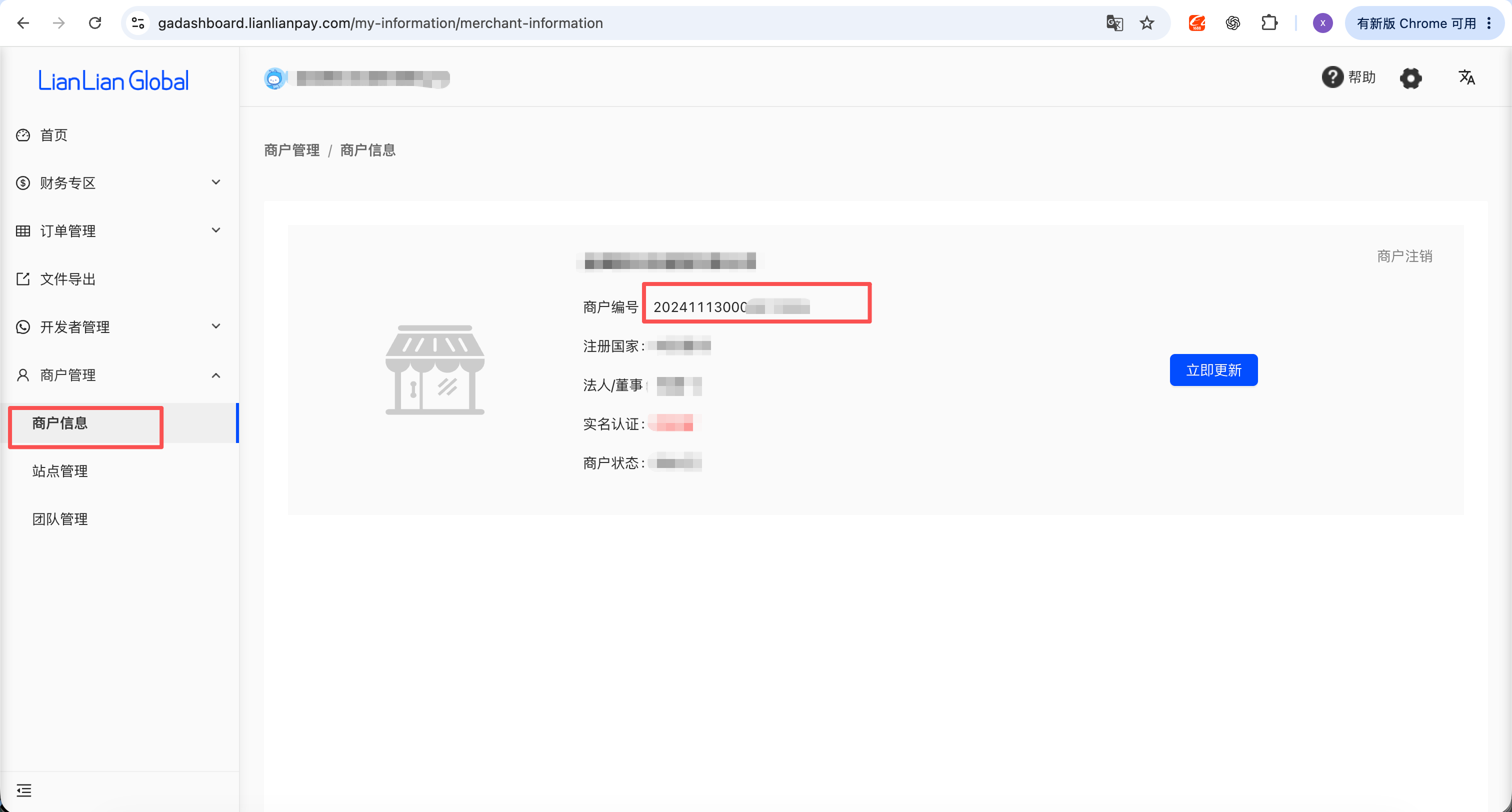
The optional LianLian Site ID is not the EFundPay merchant ID or EFundPay site ID. Enter it only when LianLian has explicitly issued a site/sub-merchant ID for this account; otherwise leave the field empty.
3. Configure the RSA keys
LianLian uses two different RSA key pairs. Their roles must not be swapped:
| Key | Where it belongs | What it does |
|---|---|---|
| Merchant private key | EFundPay Merchant Request-signing Private Key | EFundPay signs requests. |
| Paired merchant public key | LianLian Merchant Public Key | LianLian verifies requests from EFundPay. |
| LianLian platform public key | EFundPay LianLian Platform RSA Public Key | EFundPay verifies LianLian responses and notifications. |
Prepare a merchant RSA key pair according to your LianLian onboarding requirements. The private key entered in EFundPay must be a Base64-encoded PKCS#8 RSA private key. Paste only the encoded key value, without PEM headers such as -----BEGIN PRIVATE KEY-----, footers, spaces, or line breaks.
Then, in the LianLian Dashboard:
- Open Developer Management → Key Configuration.
- Register the public key paired with the merchant private key under Merchant Public Key.
- Copy the value under LianLianPay Public Key. This is the value to enter in EFundPay as LianLian Platform RSA Public Key.
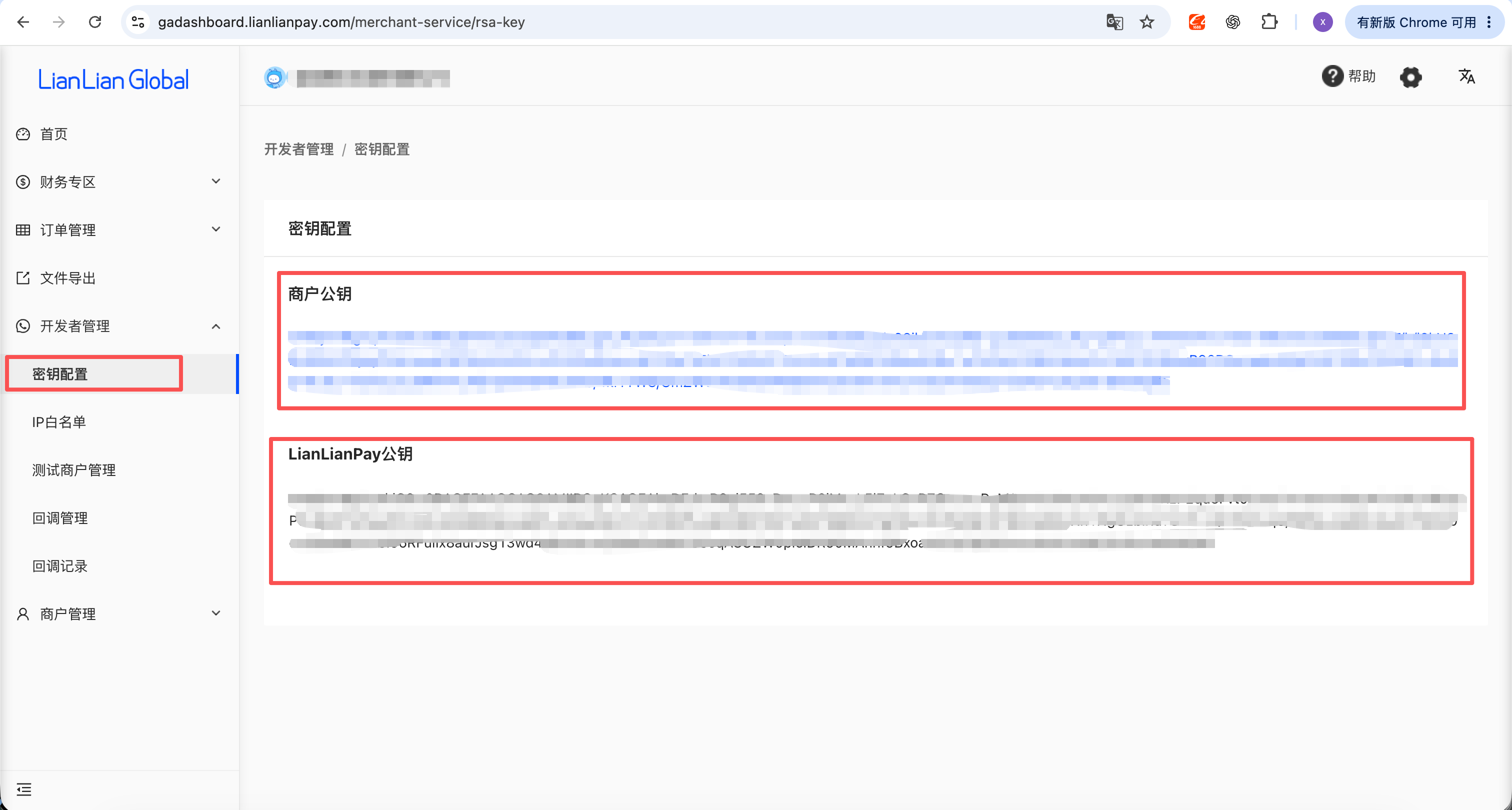
The Merchant Public Key displayed in the upper section is not the LianLian platform public key. EFundPay needs the merchant private key and the separate LianLianPay Public Key from the lower section.
When rotating a production key pair, coordinate the update so that the merchant public key registered with LianLian always matches the merchant private key saved in EFundPay.
4. Configure the EFundPay webhook URLs
For standard EFundPay payment and refund processing, EFundPay includes the payment or refund notification_url in each request sent to LianLian. You do not need to manually add a fixed EFundPay payment/refund callback URL in Developer Management → Callback Management.
Card-token results, together with the ChargeBack and RDR notifications delivered through LianLian's Dispute Callback setting, are account-level events. You must configure the two fixed EFundPay webhook URLs below in the LianLian Dashboard. The URLs are case-sensitive; copy them exactly as shown.
| LianLian callback | EFundPay webhook URL |
|---|---|
| Card Binding Result Callback | https://notify.efundpay.com/Lianlian/notifyGateway/card-tokens/notify |
| Dispute Callback (LianLian UI label; carries ChargeBack and RDR notifications) | https://notify.efundpay.com/Lianlian/notifyGateway/disputes/notify |
In the LianLian Dashboard:
- Open Developer Management → Callback Management.
- In Card Binding Result Callback, select Add.
- Paste
https://notify.efundpay.com/Lianlian/notifyGateway/card-tokens/notify, save it, and make sure the callback is enabled. - In Dispute Callback, select Add.
- Paste
https://notify.efundpay.com/Lianlian/notifyGateway/disputes/notify, save it, and make sure the callback is enabled.
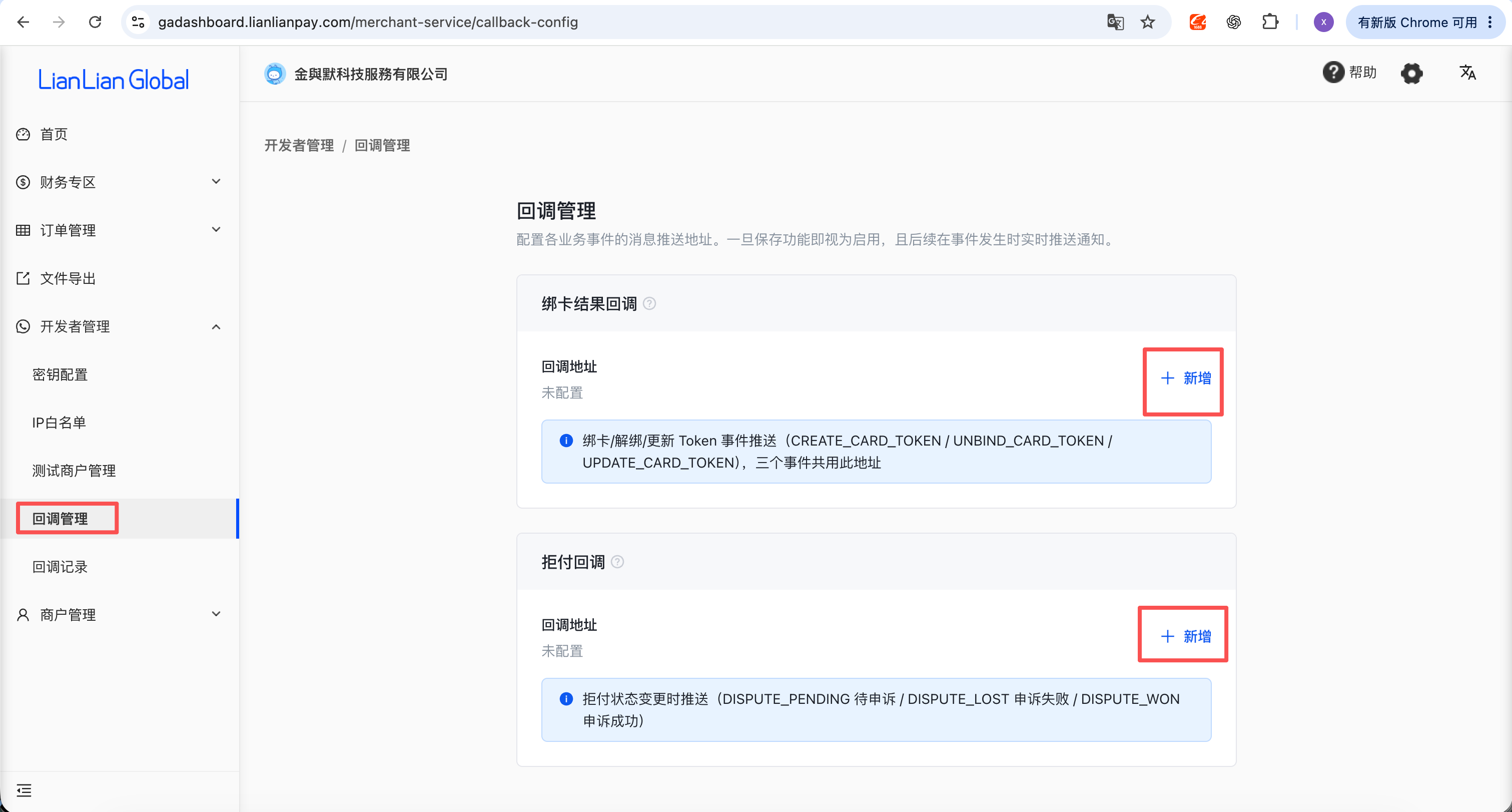
Do not put a payment or refund notification URL into either field. Payment/refund notification URLs are sent per transaction; the two URLs above are dedicated to card-token and ChargeBack/RDR notifications. Use these same EFundPay URLs for sandbox and production—the Merchant ID, optional Site ID, and RSA public key saved on the EFundPay connection determine which configuration is used to verify each notification.
Although LianLian provides one setting named Dispute Callback, this does not make an RDR notification a chargeback. ChargeBack is a formal chargeback notification and is routed into EFundPay's dispute workflow. RDR (Rapid Dispute Resolution) is a pre-dispute alert and automatic-refund outcome; EFundPay records and routes it separately and does not create a formal dispute from it.
EFundPay verifies every notification using the LianLian Platform RSA Public Key from step 3. The card-binding endpoint handles create, unbind, and update token events. The callback endpoint shown as Dispute Callback in LianLian handles both formal ChargeBack notifications and pre-dispute RDR notifications, distinguished by the dispute_type value. If the signature is valid and the event is stored successfully, EFundPay returns the acknowledgement required by LianLian.
5. Save the connection in EFundPay Dashboard
In EFundPay Dashboard, open Connections → Your connections, locate LianLian, and select Configure. Complete the form as follows:
| Dashboard field | What to enter |
|---|---|
| Reference name | A name that helps your team identify this account, such as LianLian sandbox merchant. |
| Environment | SANDBOX or PRODUCTION; it must match the merchant account and keys used above. |
| Payment methods | Select only the payment methods enabled for your LianLian merchant account. |
| Card brands | If shown, select only the card brands enabled for the account. |
| LianLian Merchant ID | The Merchant Number copied in step 2. |
| LianLian Site ID | The LianLian-issued site/sub-merchant ID, or leave it empty when none was issued. |
| Merchant Request-signing Private Key | The merchant's Base64-encoded PKCS#8 RSA private key from step 3. |
| LianLian Platform RSA Public Key | The LianLianPay Public Key copied in step 3. |
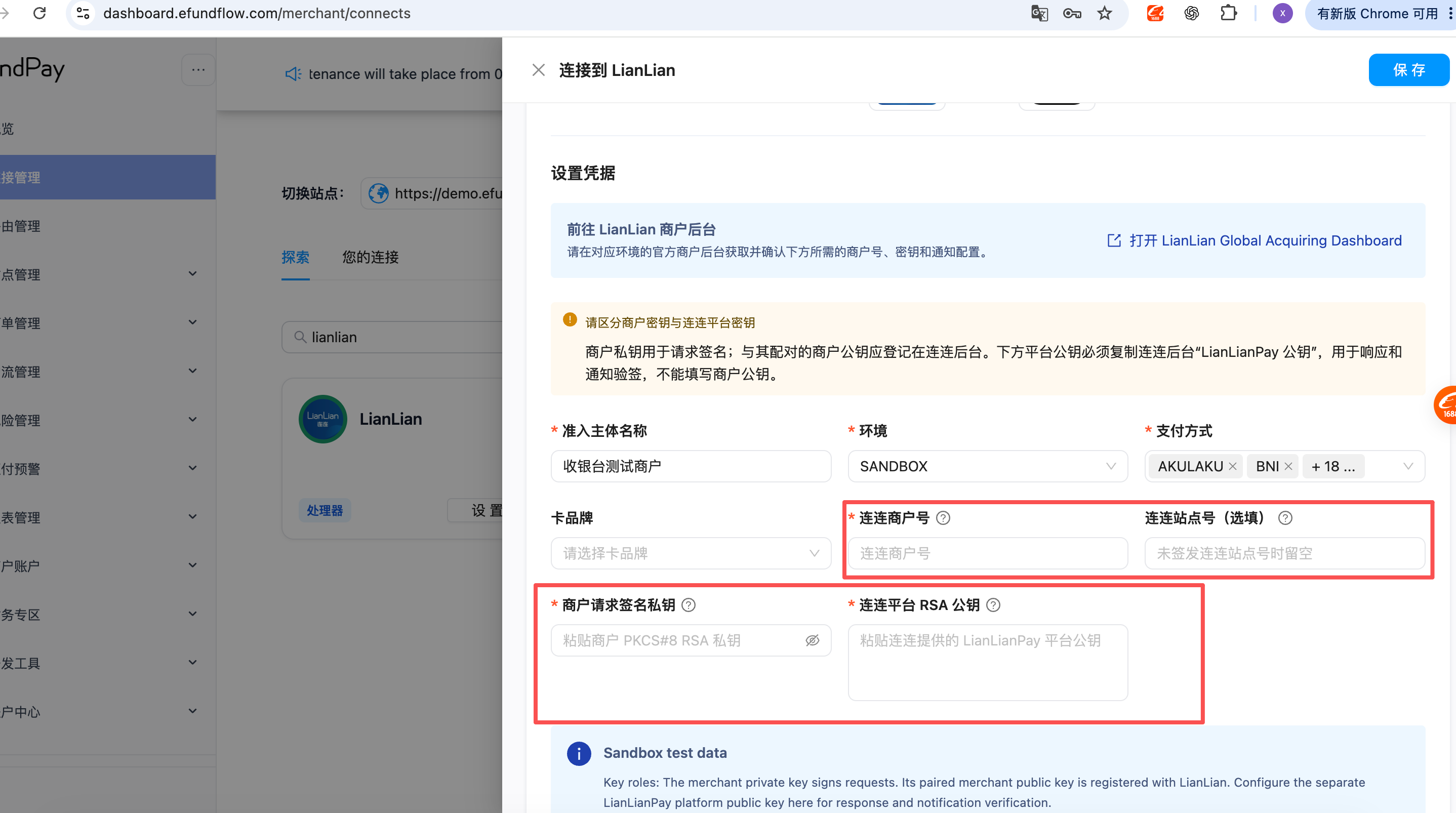
Select Save. When editing an existing connection, leave a masked secret field unchanged to keep the saved value. Clear it only when you intentionally want to replace that credential.
6. Verify the setup
Before going live:
- Confirm the Merchant ID, environment, and both RSA keys all belong to the same LianLian account and environment.
- Confirm the merchant public key registered with LianLian is paired with the merchant private key saved in EFundPay.
- Confirm the value saved as LianLian Platform RSA Public Key was copied from the LianLianPay public-key section, not from the merchant public-key section.
- Create a sandbox payment and verify that its status is updated after LianLian sends the asynchronous notification.
- Test a sandbox refund and verify the refund status update.
- Trigger or ask LianLian to send a sandbox card-binding result, then verify that the callback is successful in LianLian Callback Records.
- If ChargeBack notifications are enabled for the account, verify one sandbox
CHARGEBACKnotification in Callback Records. If the account also uses RDR, separately verify one sandboxRDRpre-dispute notification. - Repeat the merchant and key configuration for production before changing the EFundPay connection to
PRODUCTION.
Troubleshooting
| Symptom | What to check |
|---|---|
| Request signature or authentication failed | Verify that the private key is PKCS#8 Base64 without PEM headers or whitespace, and that its paired public key is registered under Merchant Public Key in the same environment. |
| Response or notification signature verification failed | Copy the LianLianPay Public Key again. Do not use the merchant public key, and make sure it belongs to the same environment as the Merchant ID. |
| Invalid secondary merchant/site ID | Leave LianLian Site ID empty unless LianLian issued one. Do not copy the primary Merchant ID or an EFundPay merchant/site ID into this field. |
| A card-binding, ChargeBack, or RDR event is not updated | Confirm that the correct URL is saved under the matching callback setting, including the capital L in /Lianlian/, and that the callback is enabled. Then check Callback Records for the HTTP result and confirm that dispute_type is CHARGEBACK or RDR as expected. |
| A card-binding, ChargeBack, or RDR callback reports a signature error | Copy the LianLianPay Public Key again and make sure the EFundPay connection Merchant ID, optional Site ID, environment, and public key belong to the account that sent the notification. |
| Payment or refund remains processing | Verify the LianLian platform public key and confirm that the transaction request was accepted. EFundPay supplies the notification URL per request; changing the card-binding or ChargeBack/RDR callback cannot fix a payment/refund notification. |
| Direct API returns a referer/site error | Confirm that the customer-facing site URL is registered and enabled for the LianLian merchant account. This is separate from the optional LianLian Site ID field. |
For an overview of the connector, see LianLianPay overview.
LianLian reference: Card binding result notification and dispute result notification.